★ What You'll Build
A text-based dungeon crawler with procedural generation, inventory management, combat mechanics, and Arduino-powered status display. The game runs on a Raspberry Pi with Python handling game logic and Arduino managing physical input/buttons.
By the end, you'll understand: game state management, procedural dungeon generation, serial communication between Python and Arduino, and narrative-driven game design.
★ The Experience
I awake in the labyrinth, no memory of who I am. All I know is that I must find the key to the portal that will take me to the next part of this endless maze. Stalking its passages, I find a rusty sword and take it in hand. Further along, I find an old chest of armor. Now my enemies will never defeat me!
I stalk endless corridors, searching for the key. As I turn a corner, I see one of my enemies coming towards me, axe in hand. We clash, weapons slashing! My enemy flees, but I let him go — I must continue my quest to find the key. No matter how long it takes me.
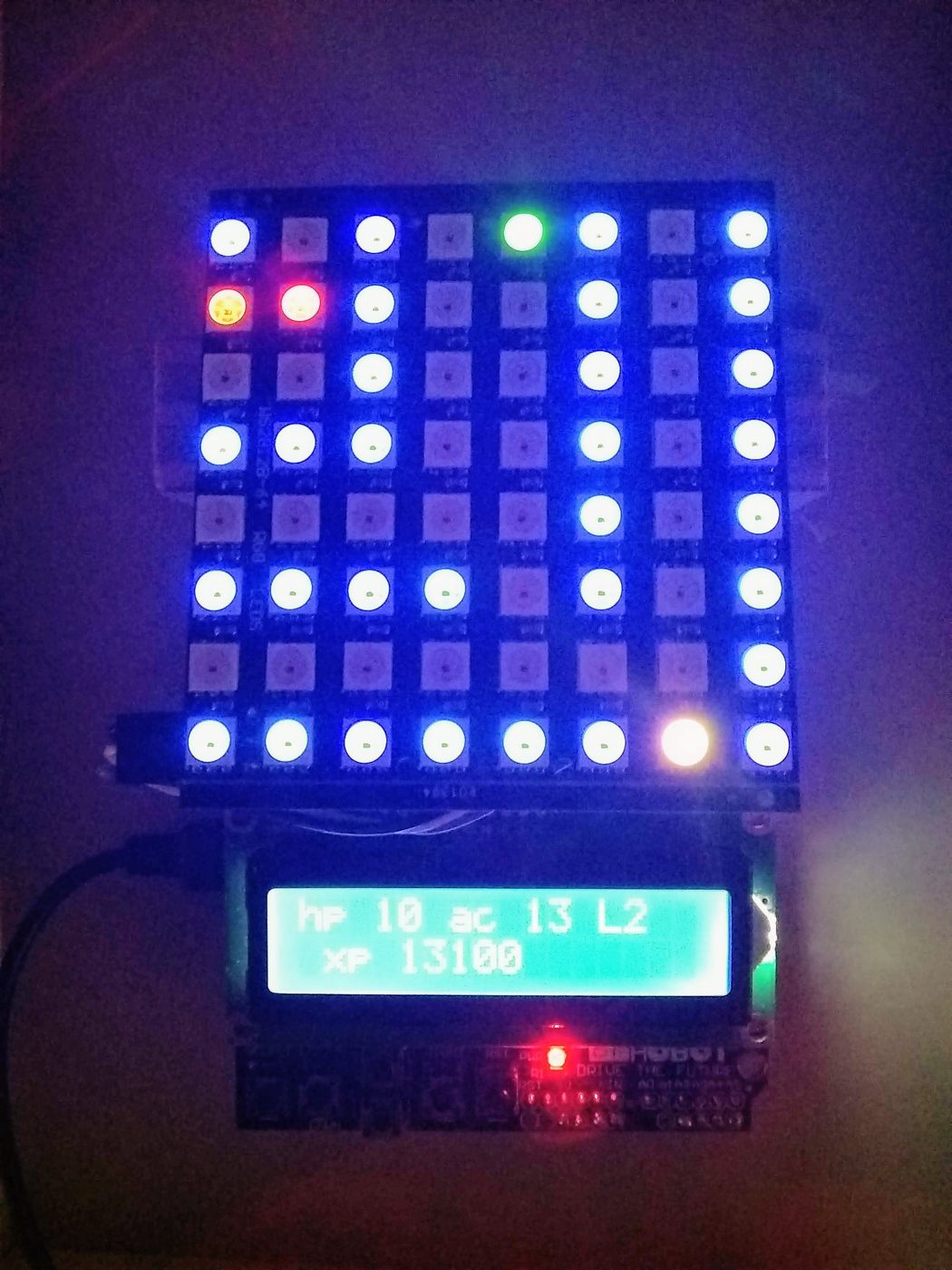
Peek through the portal into the world of Existential Crisis
How It Works
In this unique and hand-crafted electronic dungeon crawl simulator, watch the valiant hero compete against his enemies to find weapons and other items to aid him in his ultimate quest: to find the key and open the portal before they do! Watch as he uses magic potions to heal himself or blast his foes. Sigh when he makes a wrong turn and misses the key. Groan when he walks into a trap.
What You'll Need
- Raspberry Pi 3B+ or higher — Python runtime and game server
- Arduino Nano — Physical button inputs and status LEDs
- Micro USB cable — Serial communication between Pi and Arduino
- Python 3.7+ — Game logic
- pyserial — Python serial communication
sudo apt install python3-pip -y
pip3 install pyserial
Game Architecture
The game uses a client-server pattern with the Raspberry Pi as the game server and Arduino as the input/output client.
class GameState:
def __init__(self):
self.inventory = []
self.health = 100
self.position = (0, 0)
self.dungeon_map = {}
self.keys_found = 0
self.enemies_defeated = 0
self.game_over = False
Procedural Dungeon Generation
The dungeon is generated using a random walk algorithm that creates a connected graph of rooms:
def generate_dungeon(num_rooms=20):
rooms = ['entrance']
connections = {}
current = 'entrance'
for i in range(num_rooms):
if i == num_rooms - 1:
room_type = 'portal'
key = True
else:
room_type = random.choice(['combat', 'loot', 'safe'])
key = False
connections[current] = f'room_{i}'
rooms.append({'id': i, 'type': room_type, 'key': key})
current = f'room_{i}'
return rooms, connections
Arduino Serial Interface
The Arduino handles button inputs and sends commands to Python via serial:
const int BUTTON_UP = 2;
const int BUTTON_DOWN = 3;
const int BUTTON_LEFT = 4;
const int BUTTON_RIGHT = 5;
const int BUTTON_ACTION = 6;
void setup() {
Serial.begin(9600);
pinMode(BUTTON_UP, INPUT_PULLUP);
pinMode(BUTTON_DOWN, INPUT_PULLUP);
pinMode(BUTTON_LEFT, INPUT_PULLUP);
pinMode(BUTTON_RIGHT, INPUT_PULLUP);
pinMode(BUTTON_ACTION, INPUT_PULLUP);
Serial.println("ARDUINO_READY");
}
void loop() {
if (digitalRead(BUTTON_UP) == LOW) {
Serial.println("UP");
delay(200);
}
if (digitalRead(BUTTON_ACTION) == LOW) {
Serial.println("ACTION");
delay(200);
}
}
Python Serial Handler
Python receives commands and updates game state:
import serial
import threading
class ArduinoInterface:
def __init__(self, port='/dev/ttyACM0', baudrate=9600):
self.ser = serial.Serial(port, baudrate, timeout=1)
self.command_queue = []
self.running = True
self.thread = threading.Thread(target=self._read_loop)
self.thread.start()
def _read_loop(self):
while self.running:
if self.ser.in_waiting > 0:
line = self.ser.readline().decode('utf-8').strip()
if line:
self.command_queue.append(line)
print(f'Received: {line}')
The Game Loop
The main game loop processes player commands, updates game state, and renders output:
class Game:
def __init__(self):
self.state = GameState()
self.arduino = ArduinoInterface()
self.dungeon = generate_dungeon()
def run(self):
print("Welcome to Existential Crisis")
while not self.state.game_over:
if self.arduino.command_queue:
command = self.arduino.command_queue.pop(0)
self.process_command(command)
self.update_enemies()
self.check_game_state()
self.render()
time.sleep(0.1)
Inventory and Item System
Items are stored in a dictionary with stats and effects:
ITEMS = {
'rusty_sword': {'type': 'weapon', 'damage': 10, 'durability': 50},
'health_potion': {'type': 'consumable', 'heal': 25},
'steel_armor': {'type': 'armor', 'defense': 15},
'portal_key': {'type': 'key', 'unique': True}
}
def use_item(self, item_name):
if item_name not in self.state.inventory:
print("You don't have that item!")
return
item = ITEMS[item_name]
if item['type'] == 'consumable':
self.state.health += item['heal']
self.state.inventory.remove(item_name)
print(f"Used {item_name}. HP: {self.state.health}")
Combat System
Turn-based combat with dice rolls and stat modifiers:
def resolve_combat(self, enemy):
player_damage = random.randint(1, 20) + self.get_attack_bonus()
enemy.health -= player_damage
print(f"You hit for {player_damage} damage!")
if enemy.health <= 0:
print("Enemy defeated! +10 XP")
self.state.enemies_defeated += 1
return
enemy_damage = max(0, random.randint(1, 12) - self.get_armor_class())
self.state.health -= enemy_damage
print(f"Enemy hits for {enemy_damage}! HP: {self.state.health}")
if self.state.health <= 0:
print("You have fallen in battle...")
self.state.game_over = True
Game Mechanics
Procedural Generation
Each playthrough creates a unique labyrinth layout
Inventory System
Collect weapons, armor, and healing potions
Enemy AI
Smart enemies adapt to your strategies
Save States
Resume your journey from any checkpoint
Themes & Reflection
Beyond the gameplay, Existential Crisis explores philosophical questions through its narrative. What is purpose? How do we find meaning in an infinite maze? Can we overcome our own limitations when the path forward is unclear?
★ 2026 Update
This project was a learning experience that combined storytelling with programming. The Python codebase has since been refactored for better modularity, and the Arduino interface has been upgraded to support additional input methods.
Next Steps: Want to build something similar? Check out Configure Your Own Internet Router for a networking project, or Ender 3 Pro Guide for 3D printing.